Toyota RAV4 Front USB Error When Connecting a Phone
Published 6 August 2025
Sometimes the Toyota RAV4 (for example, the 2021 Plug-in Hybrid) refuses to connect to a phone, showing the error message "USB Error" or "USB device not recognized".
Symptoms
When the phone is connected, you hear the charging sound, then it stops. A second later, the sound returns. Then again, and again. The car's display may show messages such as "USB Error" or "USB device not recognized".
Possible cause
One possible explanation is that the phone is overloading the car's USB port.
In my case, a Xiaomi phone with a "Turbo charge" mode appeared to trigger the problem. My suspicion is that the phone attempts to draw too much current when it is connected, causing the car's USB system to disconnect the device. The cycle then repeats.
Suggested solution
The workaround described here has worked consistently in my tests. The idea is to reduce the current available from the USB port by inserting a 10 Ω resistor in series with the +5 V supply.
Using a USB hub
-
Obtain a simple USB hub. The hub used for this test was an
AXFEE 3-port USB 3.0 hub.
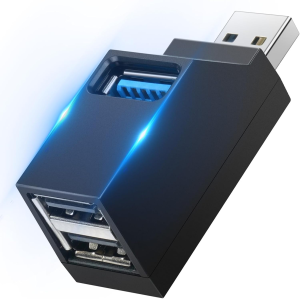
- Open the hub casing. There are no screws in this particular hub; it is held together by plastic clips.
- Remove the PCB and locate the +5 V power trace.
-
Cut the trace and solder a 10 Ω resistor
in series with the +5 V supply to the USB 2.0 ports.
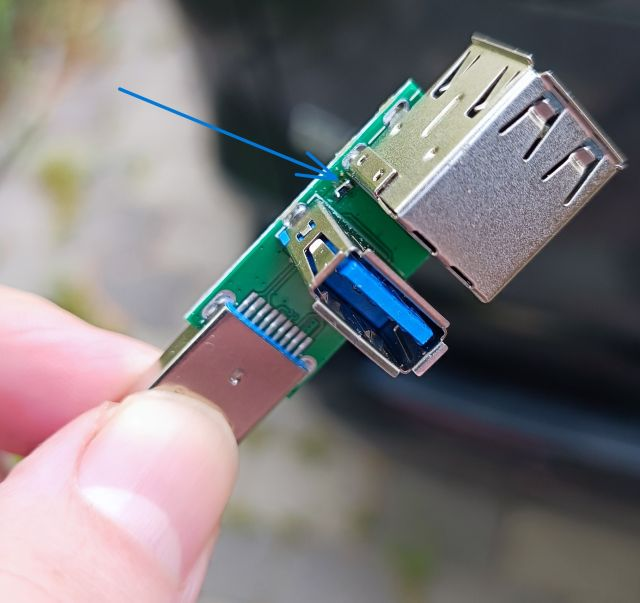
- Reassemble the hub and connect it to the USB port in the car.
- Connect the phone to one of the modified USB 2.0 ports.
On the hub I modified, this limits the charging capability of the two black USB 2.0 ports while leaving the blue USB 3.0 port unaffected.
Alternative: modify a USB cable
Another approach is to modify a USB 2.0 extension cable. If the cable is opened, the red wire is normally the +5 V supply. A 10 Ω resistor can be soldered in series with this wire.
It may also work with the +5 V connection completely disconnected, although the phone will then receive no charging current from the car. The objective of this modification is reliable USB data communication rather than charging.
Another suggested trick is to insulate the +5 V contact in a USB extension connector. I have not tested this method, and such a cable could easily cause confusion later if it were accidentally used for charging.
Expected result
With the modified USB connection, the phone should be able to start Android Auto normally, although charging may be reduced or absent.